OpenVPN
OpenVPN is a VPN protocol based on the SSL/TLS security model, widely used to provide secure remote access and site-to-site connectivity over untrusted networks. It supports both Layer 2 and Layer 3 tunneling modes, enabling the transport of Ethernet frames or routed IP traffic depending on deployment requirements.
OpenVPN supports both IPv4 and IPv6 traffic and can operate across a wide range of network topologies.
OpenVPN is available on multiple platforms, including Linux, Windows, macOS, and other operating systems. Its configuration structure is generally consistent across platforms, simplifying deployment, maintenance, and interoperability in mixed environments.
OpenVPN can operate over either User Datagram Protocol (UDP) or Transmission Control Protocol (TCP), allowing administrators to select the transport protocol best suited for their network requirements. Multiple VPN sessions can be multiplexed over a single TCP or UDP port.
OpenVPN can also operate through HTTP and SOCKS proxy servers, which may be useful in network environments with restricted outbound connectivity. Its flexibility, strong cryptographic support, and broad platform compatibility make OpenVPN a commonly deployed VPN solution.
Limitations
ROS has its own OpenVPN implementation, but not all OpenVPN features are supported, and not all unsupported features are listed. Currently, notable unsupported OpenVPN features include:
- LZO compression. **DEPRECATED** Compression is generally not recommended. VPN tunnels that use compression are vulnerable to the VORACLE attack.
- NCP autonegotiation. The cipher must be specified in the
.ovpnfile when connecting to an ROS OpenVPN server.
OpenVPN usernames are limited to 27 characters, and passwords are limited to 233 characters. The password limit was increased to 1000 characters starting from version 7.18_ab253.
OVPN Client
| Property | Description |
|---|---|
| add-default-route (yes | no; Default: no) | Whether to add OVPN remote address as a default route. |
| auth (md5 | sha1 | null | sha256 | sha512; Default: sha1) | Allowed authentication methods. |
| certificate (string | none; Default: none) | Name of the client certificate |
| cipher (null | aes128-cbc | aes128-gcm | aes192-cbc | aes192-gcm | aes256-cbc | aes256-gcm | blowfish128; Default: blowfish128) | Allowed ciphers. In order to use GCM type ciphers, the "auth" parameter must be set to "null", because GCM cipher is also responsible for "auth", if used. |
| comment (string; Default: ) | Descriptive name of an item |
| connect-to (IP|IPv6; Default: ) | Remote address of the OVPN server. |
| disabled (yes | no; Default: yes) | Whether the interface is disabled or not. By default it is disabled. |
| mac-address (MAC; Default: ) | MAC address of OVPN interface. Will be automatically generated if not specified. |
| max-mtu (integer; Default: 1500) | Maximum Transmission Unit. Max packet size that the OVPN interface will be able to send without packet fragmentation. |
| mode (ip | ethernet; Default: ip) | Layer3 or layer2 tunnel mode (alternatively tun, tap) |
| name (string; Default: ) | Descriptive name of the interface. |
| password (string; Default: "") sensitive | Password used for authentication. The value of the password should not be longer than 1000 chars. |
| port (integer; Default: 1194) | Port to connect to. |
| profile (name; Default: default) | Specifies which PPP profile configuration will be used when establishing the tunnel. |
| protocol (tcp| udp; Default: tcp) | Indicates the protocol to use when connecting with the remote endpoint. |
| verify-server-certificate(yes | no; Default: no) | Checks the certificate's CN or SAN against the "connect-to" parameter. The IP or hostname must be present in the server's certificate. |
| tls-version (any|only-1.2; Default: any) | Specifies which TLS versions to allow |
| use-peer-dns(yes | no; Default: no) | Whether to add DNS servers provided by the OVPN server to IP/DNS configuration. |
| route-nopull (yes | no; Default: no) | Specifies whether to allow the OVPN server to add routes to the OVPN client instance routing table. |
| user (string; Default: ) | User name used for authentication. |
It is also possible to import the OVPN client configuration from a .ovpn configuration file. This file is usually provided by the OVPN server and already contains the required configuration, so only a few parameters need to be configured manually.
/interface/ovpn-client/import-ovpn-configuration ovpn-password=securepassword \
key-passphrase=certificatekeypassphrase ovpn-user=myuserid skip-cert-import=no
OVPN client supports TLS authentication. The tls-auth configuration can only be added by importing a .ovpn configuration file. Using tls-auth requires generating a shared secret key, which must be included in the client .ovpn configuration file.
ROS client requires a username and password. Authentication is managed by the server side. If the server supports TLS authentication, the username is ignored.
key-direction 1
<tls-auth>
#
# 2048 bit OpenVPN static key
#
-----BEGIN OpenVPN Static key V1-----
-----END OpenVPN Static key V1-----
</tls-auth>
7.17beta5 added support to allow non-null auth in gcm mode.
Tls-crypt, tls-crypt v2
To improve TLS authentication, tls-crypt support was added in version 7.17rc3.
tls-crypt and tls-crypt v2 are supported only by the OVPN client with the following settings:
auth SHA256and nokey-directionin the server configuration;auth SHA256andkey-direction 1in the client configuration are required for authentication to work.
Example configuration files:
OVPN Server
Sub-menu: /interface/ovpn-server
An interface is created for each tunnel established to the specified server. There are two types of interfaces in the OVPN server configuration:
- Static interfaces are added administratively when there is a need to reference a specific interface name (for example, in firewall rules or elsewhere) created for a particular user.
- Dynamic interfaces are added to this list automatically whenever a user connects and their username does not match any existing static entry, or if the matching static entry is already active, since two separate tunnel interfaces cannot use the same name.
Dynamic interfaces appear when a user connects and disappear after the user disconnects. Because of this, it is not possible to reference the tunnel created for that user in router configuration (for example, in firewall rules). If persistent rules are required for a user, create a static entry. Otherwise, dynamic configuration is sufficient.
After upgrading to version 7.17, the OVPN server receives its own configuration due to multiple server support.
A disabled OVPN server with an assigned MAC address appears in the configuration:
/interface/ovpn-server/server/add mac-address=99:99:99:99:99:99 name=ovpn-server1
Warning: In both cases, PPP users must be configured properly. Static entries do not replace PPP configuration.
Server Configuration
Properties
| Property | Description |
|---|---|
| auth (md5 | sha1 | null | sha256 | sha512; Default: sha1,md5,sha256,sha512) | Authentication methods that the server will accept. |
| certificate (name | none; Default: none) | Name of the certificate that the OVPN server will use. |
| cipher (null | aes128-cbc | aes128-gcm | aes192-cbc | aes192-gcm | aes256-cbc | aes256-gcm | blowfish128; Default: aes128-cbc,blowfish128) | Allowed ciphers. |
| default-profile (name; Default: default) | Default profile to use. |
| disabled (yes | no; Default: yes) | Defines whether the OVPN server is enabled or not. |
| protocol (tcp| udp; Default: tcp) | Indicates the protocol to use when connecting with the remote endpoint. |
| keepalive-timeout (integer | disabled; Default: 60) | Defines the time period (in seconds) after which the router is starting to send keepalive packets every second. If no traffic and no keepalive responses have come for that period of time (i.e. 2 * keepalive-timeout), the not responding client is proclaimed disconnected |
| mac-address (MAC; Default: ) | Automatically generated MAC address of the server. |
| max-mtu (integer; Default: 1500) | Maximum Transmission Unit. Max packet size that the OVPN interface will be able to send without packet fragmentation. |
| mode (ip | ethernet; Default: ip) | Layer3 or layer2 tunnel mode (alternatively tun, tap) |
| name (string) | Name of the server |
| netmask (integer; Default: 24) | Subnet mask to be applied to the client. |
| port (integer; Default: 1194) | Port to run the server on. |
| require-client-certificate (yes | no; Default: no) | If set to yes, then the server checks whether the client's certificate belongs to the same certificate chain. |
| redirect-gateway (def1 | disabled | ipv6; Default: disabled) | Specifies what kind of routes the OVPN client must add to the routing table. def1 – Use this flag to override the default gateway by using 0.0.0.0/1 and 128.0.0.0/1 rather than 0.0.0.0/0. This has the benefit of overriding but not wiping out the original default gateway. disabled - Do not send redirect-gateway flags to the OVPN client. ipv6 - Redirect IPv6 routing into the tunnel on the client side. This works similarly to the def1 flag, that is, more specific IPv6 routes are added (2000::/4 and 3000::/4), covering the whole IPv6 unicast space. |
| enable-tun-ipv6 (yes | no; Default: no) | Specifies if IPv6 IP tunneling mode should be possible with this OVPN server. |
| ipv6-prefix-len (integer; Default: 64) | Length of IPv6 prefix for IPv6 address which will be used when generating the OVPN interface on the server side. |
| reneg-sec (integer; Default: 3600) | Key renegotiation seconds, the time the server periodically renegotiates the secret key for the data channel. |
| push-routes (string; Default: ) | Push route support is added in 7.14, the maximum of possible input is limited to 1400 characters or 37 pushed routes. IPv6 support added in 7.21_ab220. |
| tls-version (any| only-1.2 ; Default: any ) | TLS protocol setting. |
| tun-server-ipv6 (IPv6 prefix; Default: ::) | IPv6 prefix address which will be used when generating the OVPN interface on the server side. |
| user-auth-method (mschap2 | pap ; Default pap) | By default pap authentication method is used, if preferred server authentication with chap challenge set mschap2 in server settings. |
| vrf () | VRF in which to listen for connection attempts |
It is also possible to prepare a .ovpn file for the OVPN client, which can be easily imported on the end device. The server must have the required client certificate option enabled for export to work.
/interface/ovpn-server/server/export-client-configuration ca-certificate=ca.crt  client-certificate=cert_e
xport_rw-client.crt  client-cert-key=cert_export_rw-client.key server-address=1.1.1.1 server=ovpn-server1
::: It is very important that the router date is within the validity period of the installed certificate. To avoid certificate verification issues, enable NTP date synchronization on both the server and the client. :::
Example
Setup Overview
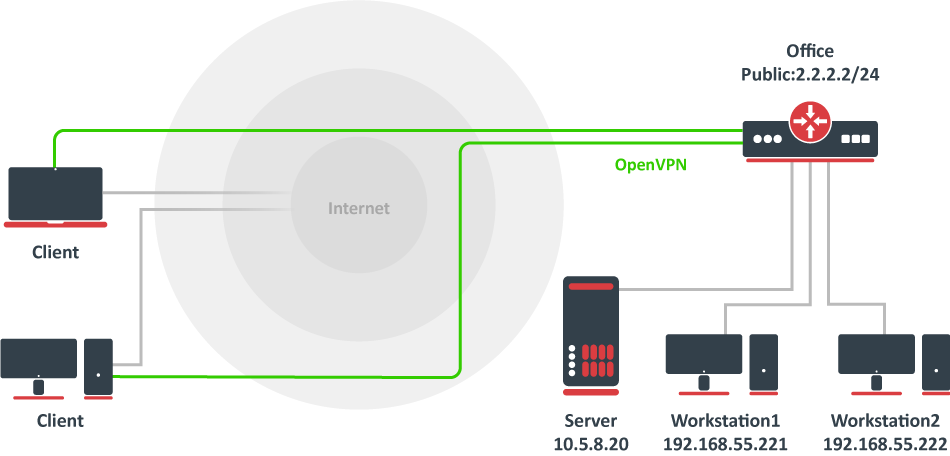
Assume that the office public IP address is 2.2.2.2, and two remote OVPN clients need access to the 10.5.8.20 host and the 192.168.55.0/24 network located behind the office gateway.
Creating Certificates
All certificates can be created on the RouterOS server using the certificate manager. See example >>
For the simplest setup, only an OVPN server certificate is required.
Server Config
The first step is to create an IP pool from which client addresses will be assigned, and then create user accounts.
/ip/pool/add name=ovpn-pool range=192.168.77.2-192.168.77.254

/ppp/profile/add name=ovpn local-address=192.168.77.1 remote-address=ovpn-pool
/ppp/secret
add name=client1 password=123 profile=ovpn
add name=client2 password=234 profile=ovpn
Assume that the server certificate has already been created and is named server.
/interface/ovpn-server/server/add disabled=no certificate=server name=myServer
Client Config
Manually add which networks you want to access over the tunnel.
/interface/ovpn-client
add name=ovpn-client1 connect-to=2.2.2.2 user=client1 password=123 disabled=no
/ip/route
add dst-address=10.5.8.20 gateway=ovpn-client1
add dst-address=192.168.55.0/24 gateway=ovpn-client1
/ip/firewall/nat/add chain=srcnat action=masquerade out-interface=ovpn-client1
Push Route
Push route support was added in version 7.14. The maximum input is limited to **1400** characters or 37 routes. IPv6 support was added in version 7.21_ab220.
Example: route network/IP [netmask] [gateway] [metric].
/interface/ovpn-server/server/set myServer push-routes="192.168.102.0 255.255.255.0 192.168.109.1 9"

/interface/ovpn-server/server/set push-routes-ipv6="fdaa::/64,2001:db8::/32" 0
VRF support
Support starting from **version 7.17** was added, and several configuration changes were introduced. If you are using the latest version, refer to this example:
      /interface/ovpn-server/server
        add disabled=no certificate=yourcert auth=sha1 cipher=aes128-cbc require-client-certificate=yes protocol=tcp name=ovpn-server1 vrf=main